LOUKIENE Wireless Quiz Buzzer System 262 Feet
The LOUKIENE wireless quiz buzzer system is built for one job: the moment a player hits their button, every other button locks out — no disputes, no "I buzzed first" arguments. Available in 8-button and 10-button configurations, it runs on 2.4GHz wireless up to 262 feet and suits classroom contests, family trivia nights, company training sessions, and bar quiz events alike.

Both Configurations at a Glance
Quiz Buzzer 10-Button Set
See on Amazon
Quiz Buzzer 8-Button Set
See on AmazonSee more products
Discover the full product lineup with current selection on Amazon.
All products on AmazonSet Configurations Side by Side
Both sets run the same 2.4GHz wireless system with 262-foot range and include a display screen and host remote. The differences come down to button count, package dimensions, and weight.
| Model | Button Count | Included Components | Dimensions | Weight | Best For |
|---|---|---|---|---|---|
| LK-JTQ2 (10-Button Set) | 10 buttons | 1 display screen, 1 remote, 10 buttons | 14×10×0.1 in | Not listed | Full classrooms, large family gatherings, 10-team bracket events |
| LK-LFT20 (8-Button Set) | 8 buttons | Display screen, remote control, 8 buttons | 14×10×4 in | 4 lbs | Bar trivia nights, team-of-two formats, portable event use |
If your player or team count sits comfortably at eight or below, the 8-button set covers you and ships in a tidier package. Go with the 10-button set if you're running individual-player competitions or want two buttons in reserve as the game scales.
How to Pick the Right Button Count for Your Game
The core decision is simple: how many players or teams are buzzing in at once? The 10-button set covers up to 10 individual players or 10 teams — enough for a full classroom row, a large family gathering, or a company-wide trivia bracket. The 8-button set covers most standard setups: four two-person teams, eight individual competitors, or a pub quiz table configuration where groups share one buzzer.
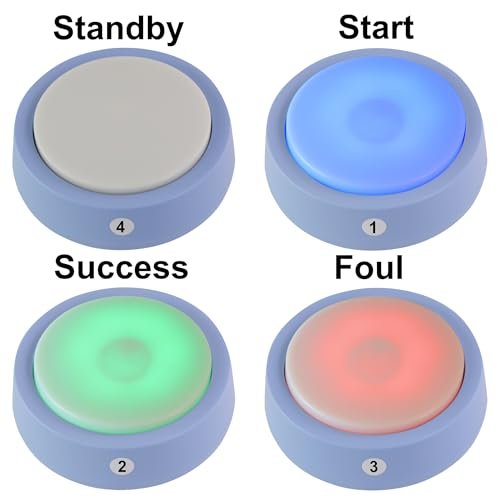
Both sets include the same display screen and remote control. The display screen shows which button number buzzed in first, so the host doesn't have to watch every player simultaneously — the screen makes the call. The remote lets the host reset the lockout between questions without walking across the room.
A few things worth thinking through before you order:
- Player count vs. team count. If you're running team-based play, 8 buttons covers most formats. If every individual competitor gets their own button, count heads and choose accordingly.
- Growth room. If your trivia night or classroom competition might expand, the 10-button set gives you two extra buttons sitting in reserve.
- Portability. The 8-button set ships in a 14×10×4 inch package at 4 pounds — compact enough to carry to a venue in a tote bag. If you're running a mobile trivia event, that portability matters.
Real Setups Where This System Works Well
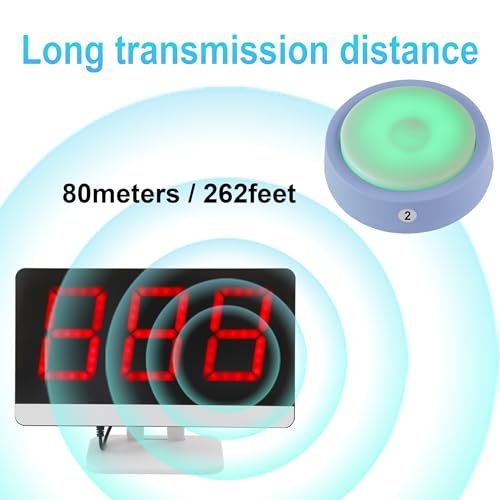
At 262 feet of wireless range on 2.4GHz, this system covers distances that most indoor venues never approach. A standard classroom is 28–32 feet wide. A living room is under 20 feet. A mid-sized event hall rarely exceeds 100 feet across. What 262 feet actually means in practice is that you're not going to hit a range wall — the signal handles the full space without moving the display unit closer to the players.
The lockout behavior is what makes or breaks a buzzer system for competitive use. The moment any button is pressed, the display registers that button's number and the other buttons stop responding until the host presses reset on the remote. There's no window where two players can both get credit. For classroom debate contests, that clarity is essential — students accept "the screen says 4" as authoritative in a way they won't accept a host's judgment call. For family trivia nights, it removes the single most common argument from the table.
Some specific contexts where this configuration works:
- Elementary and middle school classrooms. The age range on the box starts at 3 years old, and the buttons are large enough for younger students to operate without frustration. Teachers use these for spelling bees, math fact drills, and social studies contests.
- Corporate training and onboarding sessions. A team of eight new hires competing on compliance knowledge retains more than the same team sitting through a slide deck. The buzzer creates stakes.
- Weekly bar trivia nights. The host keeps the remote. Teams share a button. No one argues about who answered first because the display ends the argument before it starts.
- Family game nights and holiday gatherings. Setup takes minutes — no pairing ritual, no app, no Wi-Fi required. Everyone from age 6 to age 70 understands the concept of "hit the button first."
Setup, Storage, and Keeping the System Running
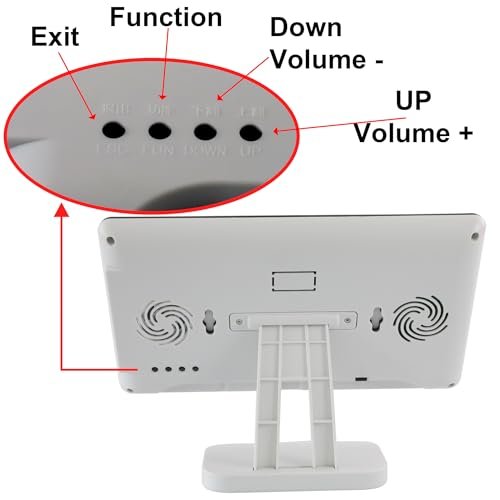
There's no programming required before first use. The buttons and display screen communicate wirelessly at 2.4GHz out of the box. The one step that catches people: make sure the display unit is powered on and within range before distributing buttons to players — if players press their buttons before the display is active, the lockout sequence won't register correctly for that round.
Between uses, store the buttons and display unit together. The 8-button set's packaging (14×10×4 inches at 4 pounds) is practical enough to function as a carry case if you're taking the system to a venue. The buttons are lightweight individual units — stack them or keep them in a bag, but don't let them rattle loose in a drawer where the battery contacts can get dirty.
A few things that prevent the most common issues:
- Check batteries before an event, not during it. Low batteries in a button can cause it to respond slowly or not register, which looks like a lockout failure but is actually a power issue.
- Keep 2.4GHz interference in mind. This system shares its frequency band with Wi-Fi routers and Bluetooth devices. In a location with heavy wireless traffic — a corporate office with dozens of active devices, for example — place the display unit centrally rather than in a corner to maximize stable connection to all buttons.
- Reset between every question. The host remote is the single point of control. Getting into the habit of a consistent reset rhythm (press reset, confirm display clears, announce the question) keeps gameplay fast and prevents disputes about whether a button was still locked from the previous round.
- Keep buttons away from moisture. These are electronics, not rated for water resistance. A trivia night in a bar environment means drinks on the table — brief players to set buttons on the table edge rather than next to glasses.
Frequently Asked Questions
Does the system actually lock out other buttons the instant someone buzzes in?
Yes — that's the core function. The first button pressed registers on the display screen and the other buttons stop responding until the host resets via the remote. There's no window where two simultaneous presses both get credit. At 2.4GHz, the transmission from button to display is fast enough that in normal quiz play — where human reaction times are measured in hundreds of milliseconds — there's no perceptible lag between the press and the lockout. For family game nights, classroom contests, and bar trivia, the system is fast enough that lag won't factor into any dispute.
How does the host know which player buzzed in first?
The display screen shows the number of the button that registered first. The host doesn't need to watch every player — the screen makes the call and displays it clearly. After judging the answer, the host presses reset on the included remote control and the system is ready for the next question. No walking across the room, no manual reset on the display unit itself.
Does this system need Wi-Fi, an app, or any pairing setup before use?
No. The system operates on its own 2.4GHz wireless signal — it doesn't connect to your home Wi-Fi or require any app. The buttons and display screen come paired from the factory. Power on the display unit, distribute the buttons, and you're playing. The only pre-use step worth noting: turn the display on before players start pressing buttons, so the system is active and ready to register the first press correctly.
Will the 262-foot range actually matter indoors?
For most indoor settings, you'll never come close to the range limit. A standard classroom is roughly 30 feet across. A living room is under 20 feet. An event hall big enough to challenge this system's range would seat several hundred people. What 262 feet means in practice is that you're not constrained by room size — place the display anywhere central and the buttons will reach it. The more relevant factor indoors is 2.4GHz interference from nearby Wi-Fi routers or Bluetooth devices; placing the display unit in the center of the space rather than near a router keeps the connection stable to all buttons.
Can kids use this, or is it sized for adults?
The age range listed is 3 years and up, and the button design is straightforward enough that young children can operate it without help. There's one button to press — no menus, no modes to toggle during play. For classroom use with elementary-age students, teachers find that the clear visual feedback on the display screen (a number appears showing who buzzed in) keeps the game moving without confusion about who answered first.
What's the difference between the 8-button and 10-button sets beyond the button count?
Both sets include a display screen and a host remote and run the same 2.4GHz wireless system with 262-foot range. The 8-button set (LK-LFT20) ships in a 14×10×4 inch package at 4 pounds — a specific, known dimension that makes it easy to pack for mobile trivia events. The 10-button set (LK-JTQ2) gives you two additional buttons, which matters if you're running individual-player competitions or want spares available. If eight players or eight teams is your ceiling, the 8-button set covers your use case cleanly.